Visual PDF Merge
Combine multiple PDFs with drag-and-drop visual ordering before generating the final file.
STZ PDF Suite
Merge documents, convert files and adjust images in batches. Seven tools in a renewed interface, with local processing on Windows.
Installer includes the backend. No Python installation required. The installer checks WebView2.
From collecting documents to preparing images: previews, progress and cancellation for every batch.
Combine multiple PDFs with drag-and-drop visual ordering before generating the final file.
Sort images and preview the new names before running the batch.
Convert PDF pages to images, images to PDF, and images between supported formats.
Insert pages into existing PDFs without switching tools for common document operations.
Run post-processing on images and PDF pages with progress, cancellation, and clear organization.
Tauri + React, light and dark themes and nine languages. Local Python processing without uploading documents.
Export pages with format, DPI and quality controls. Organize output by document.
Collect images into a PDF, review the input list and adjust output in the settings panel.
Organize and rename images with a prefix, numbering and an output name preview.
Compare before and after, adjusting brightness, contrast, color, gamma and sharpness before applying to the batch.
Light and dark themes and nine languages. The same organization for documents and images.
Upgrading from the previous version? Qt preferences are imported automatically, with a backup.
The gear beside the app name opens language, theme and feedback in a floating panel. Sending is optional: no PDF, image or local path is included with your message.
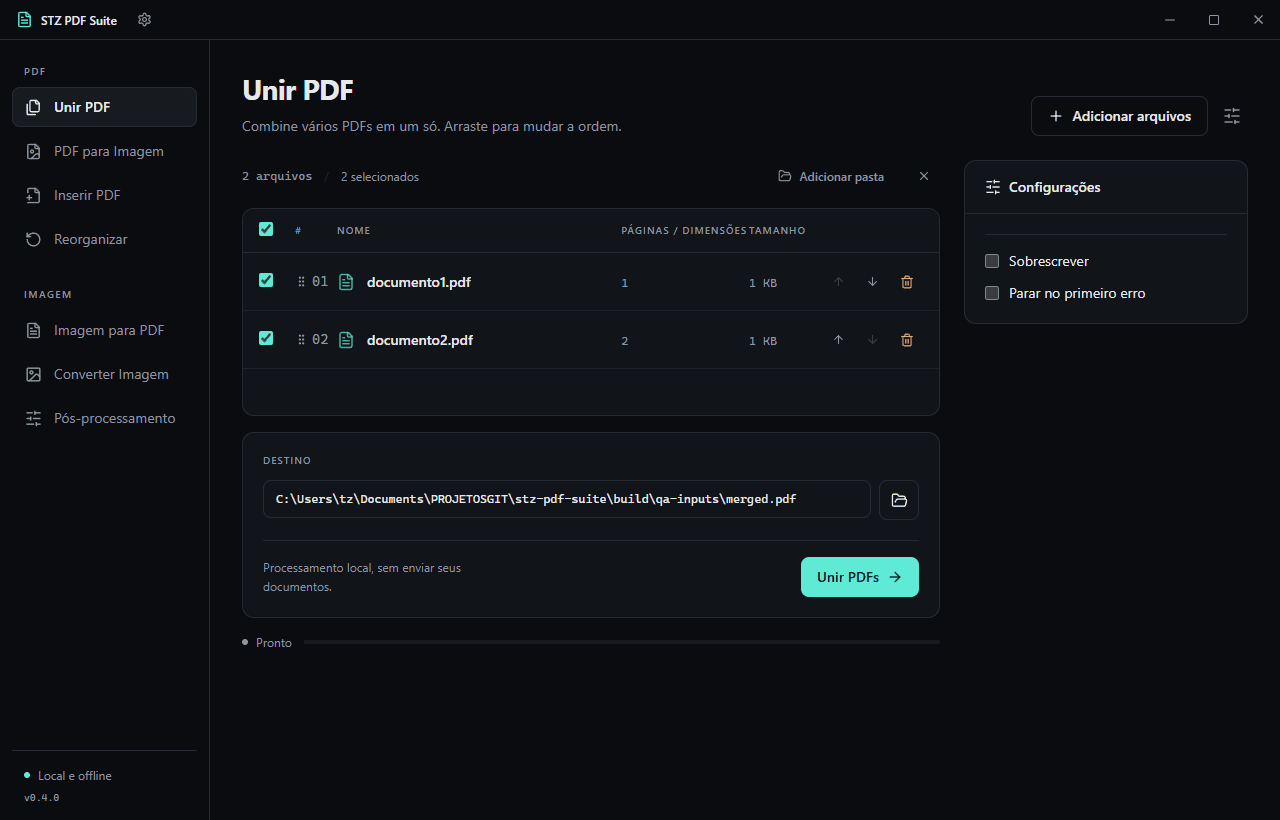
Watch a short merge demonstration. The animation loads only when you choose to play it.